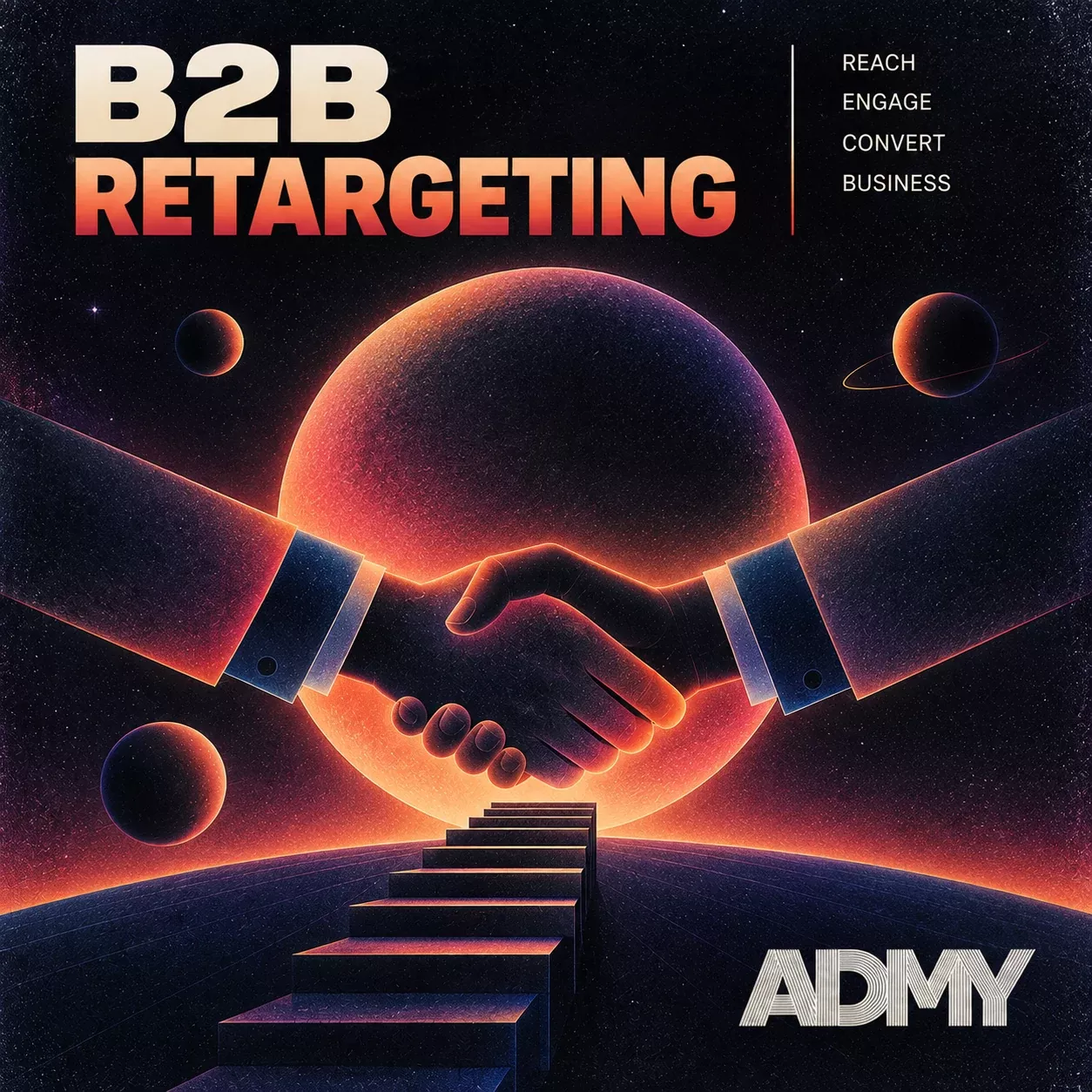
B2B retargeting re-engages business buyers by showing them paid ads after they leave your site without booking a demo or asking for pricing. A tag records who reads the pricing page or the documentation, and that visitor joins an audience. Your ads then reach the same person later on LinkedIn, in Google's network or on publisher sites. A B2B deal takes months, and several people inside the company sign off on it. Retargeting in B2B marketing keeps the offer in front of them until the account is ready to talk.
EN
RU

How B2B Retargeting Works
B2B retargeting works in four moves, and the mechanics are the same ones consumer retargeting uses. What changes in B2B is who you are reaching and how long you have to reach them. Here is the sequence on any platform.
- The tag fires. A retargeting pixel records which page was viewed and when. On LinkedIn that tag is the Insight Tag, on Google the Google tag.
- The visitor joins an audience. Rules decide the list: all visitors, pricing page viewers, people who opened the API documentation.
- The platform matches the audience. LinkedIn matches visitors to member accounts, Google to its signed-in users and cookies, a programmatic platform to browser and device identifiers.
- Ads run inside the window. The visitor keeps seeing ads until they convert, age out of the membership window or get excluded by a rule.
Step four is where B2B budgets leak most often. A visitor who booked a demo yesterday and still sees "Book a demo" today costs money and signals that nobody on your side is watching the account. Platforms handle this with include and exclude rules on audiences: the campaign includes the audience of site visitors and excludes everyone who has registered or bought.
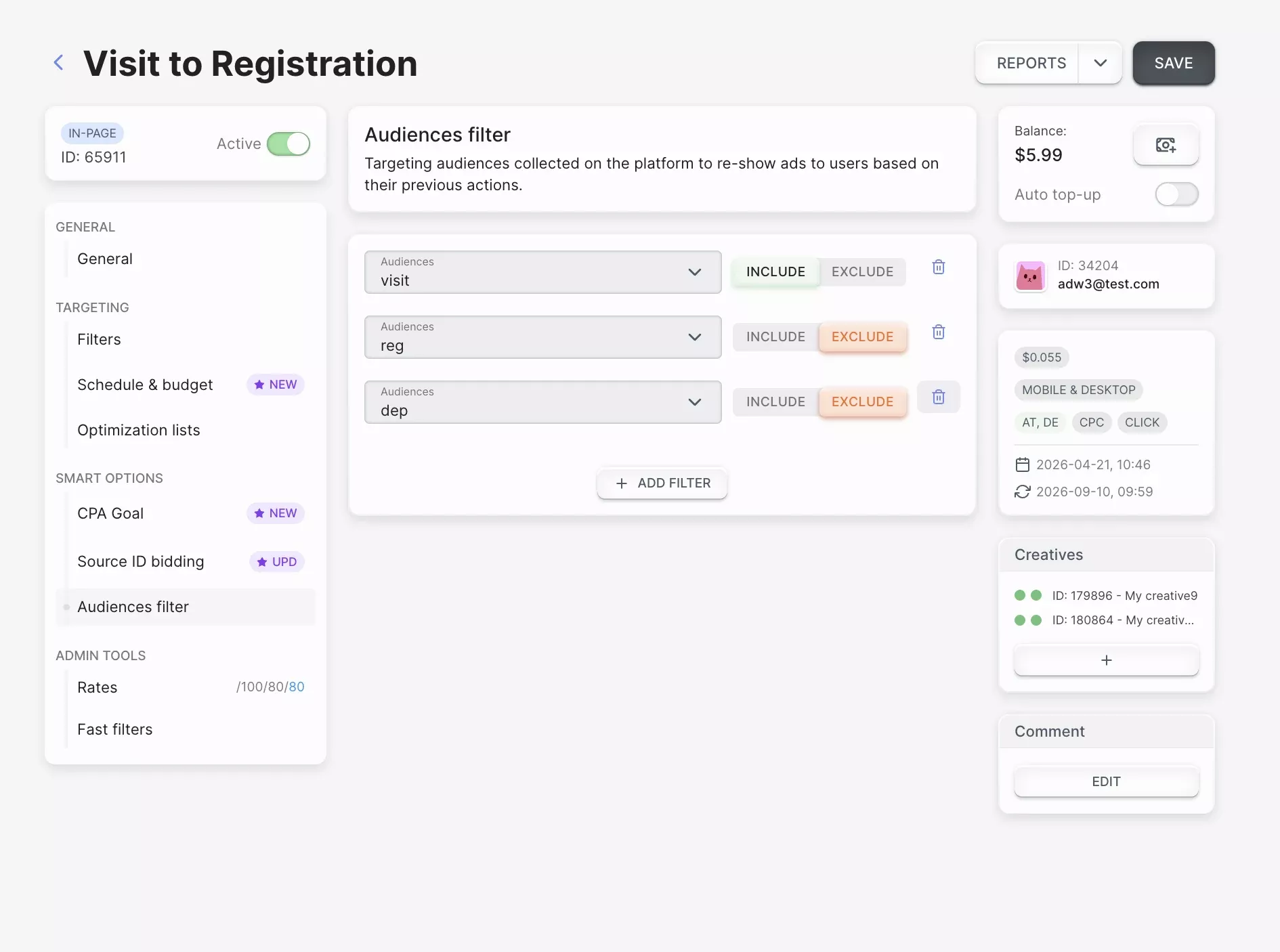
Step two, building the audience, can start from four different sources. Which one you pick decides who ends up in the campaign.
| Type | Audience source | Best use in B2B | Main limit |
|---|---|---|---|
| Pixel-based | Tag on your site | Anonymous visitors, pricing and demo pages | Cookie lifetime, platform audience minimums |
| List-based (CRM) | Uploaded emails from your CRM | Stalled deals, closed-lost accounts, renewals | Match rate, right to upload the contacts |
| Account-based | Company lists or IP-to-company data | Named target accounts | IP data blurs with remote work and VPNs |
| Engagement-based | Video views, lead forms, event sign-ups inside a platform | People who never visited the site | Audience stays inside that one platform |
Pixel-based and list-based audiences
Pixel-based and list-based audiences reach two different groups. The pixel picks up anonymous visitors, and the CRM list reaches contacts you already know by name. A pixel audience grows on its own from traffic, but it tracks browsers rather than people: the same finance director counts twice if she opens your site on a laptop and on a phone.
A list-based audience starts from your CRM. You upload emails, the platform hashes and matches them, and the ads reach named people from stalled opportunities, closed-lost deals or accounts coming up for renewal. LinkedIn notes that a contact list can take up to 48 hours to build, so a list uploaded on Friday afternoon rarely serves before Monday.
Google Customer Match has a catch that matters only in B2B. Uploaded contacts have to belong to a Google Account. Corporate accounts such as Google Workspace cannot be targeted, so work emails at companies running on Workspace will not match. Before deciding where the list budget goes, I'd check the match rate of the same CRM file on each platform.
Account-level retargeting
Account-level retargeting is the retargeting layer of account-based marketing (ABM). It shows ads to people at the companies on your target account list, which brings a campaign closest to the whole buying committee. You upload the list of companies, and the platform reaches employees who fit the job functions you choose. On LinkedIn this works directly from company names, since members list their employer on their profile.
IP-to-company matching is the weaker version. It used to be reliable when buyers sat on an office network. A visit from home or through a corporate VPN resolves to an internet provider or to the VPN exit instead. I'd treat an IP-matched account as a hint that someone there may be looking and wait for a second signal before spending on the whole account.
Why B2B Audiences Shrink Before They Serve
B2B retargeting audiences shrink before they ever serve, because a setup built for ecommerce assumes one buyer who decides within days. A B2B account takes a quarter or longer, and the person who clicked your ad is rarely the one who signs.
Three things follow from that, and each one shrinks the audience you can actually reach. Part of the buying group never touches your pixel. Safari deletes the cookie long before the deal closes. The membership window you set may end before the buyer comes back.
Buying committees in B2B deals
A B2B purchase is decided by a group, and one visit to your site shows you one member of it. Gartner's 2017 Digital B2B Buyer Survey covered 750 buyers. It puts the typical buying group for a complex solution at six to ten decision-makers. Buyers in that survey spent about 17% of their purchase time meeting potential suppliers, and when several vendors are compared, any single one gets 5-6% of it. The rest of the evaluation happens without you in the room, which is the window retargeting has to work in.
Your pixel audience holds the analyst who compared three vendors on a Tuesday night. It does not hold the CFO who will approve the budget and has never opened your site. List-based and account-level audiences exist in B2B largely to reach the people the pixel never sees. Search retargeting is a third route to them, built from queries typed on other companies' sites rather than from visits to yours, though the partners selling that data cover North America rather than the EU.
Safari's 7-day cookie cap
Safari's Intelligent Tracking Prevention (ITP) limits cookies set by JavaScript to seven days, which is shorter than almost any B2B sales cycle. Most ad tags write their cookies that way, so a Safari visitor who returns on day eight looks new, and one who stays away falls out of the audience.
How long the cookie survives depends on how the visitor arrived and on who set the cookie. Three cases cover almost everything.
The first case is an ad click, and there the cap drops to 24 hours. ITP applies it when the visitor arrives from a site it classifies as a cross-site tracker, through a link with parameters such as gclid or fbclid (WebKit documentation).
The second case is a cookie set by your own server through the Set-Cookie header. It can outlive the seven days, but only while Safari treats that server as part of your site. The seven-day cap comes back when the tagging server sits behind a CNAME pointing to a third-party host, or when its IP address does not start the same way as your website's.
A server-side container hosted with a vendor often fails that check, so before planning a 90-day audience around server-set cookies I'd open the site in Safari and look at the cookie expiry. The third case is the CRM list, which sits outside the problem altogether, because it matches on email rather than on a cookie.
Membership duration settings
Membership duration works best when it matches the length of your sales cycle, and Google Ads gives the same advice in its help pages. Each platform also sets its own ceiling, so the cycle is not the only number that matters. On Google Ads a remarketing list runs up to 540 days.
Memberships older than 540 days stop counting under the Customer Match policy. A CRM list needs at least 100 members added or updated inside that window to stay eligible.
LinkedIn caps a website audience at 180 days, with lookback windows of 30, 60, 90 or 180 days. The 365-day window exists only for engagement audiences such as video viewers and lead form openers.
My rule is to set the all-visitor audience to the typical time from first visit to signed contract. On LinkedIn that means 180 days at most, and decision-stage audiences stay shorter. Someone who viewed pricing 200 days ago has usually decided already, and a "Talk to sales" ad will not reopen it.
Minimum Audience Sizes in B2B
A B2B retargeting campaign needs 300 matched members on LinkedIn and 100 active users in the last 30 days on Google Ads before it serves. Below those numbers it shows as active and spends nothing. That is a real risk in B2B, where a pricing page in a narrow vertical can see a few dozen visitors a month.
| Platform | Minimum to serve | What else applies |
|---|---|---|
| LinkedIn Matched Audiences | 300 matched members | Location is a required targeting facet, so the floor applies after the location filter |
| Google Ads remarketing (Display, Search, YouTube) | 100 active users in the last 30 days | Customer lists uploaded before 1 February 2024 and never refreshed still need 1,000 matched users |
| Google Ads Customer Match | 100 members added or updated in the last 540 days | Older memberships drop out of the count |
The thresholds come from LinkedIn's audience size rules and the Google Ads help pages. When a segment sits below the floor, I'd clear it in one of four ways that keep the audience warm:
- Extend the lookback window. A 90-day audience holds more people than a 30-day one, though fewer than three times as many, since returning visitors count once.
- Merge segments with the same intent. Pricing, integrations and security documentation become one evaluation audience.
- Combine signals on LinkedIn. Add video viewers and lead form openers to website visitors; LinkedIn itself suggests selecting several lists to reach the minimum.
- Add the CRM list of open opportunities. Known contacts come in regardless of their cookies.
Traffic volume sets the same limit at ADMY, a programmatic advertising platform where I work on retargeting. The one case where an ADMY retargeting campaign does not pay off is a brand with a small flow of visitors. When few people reach the product site, there is almost nobody to show a return offer to. For a B2B company with low traffic, I'd put the first budget into bringing buyers to the site and start retargeting after.
B2B Retargeting Strategies by Funnel Stage
A B2B retargeting strategy needs at least three audiences, one for each funnel stage. Blog readers get educational material that names the problem you solve. Visitors of pricing and integration pages get comparisons and case studies, and people who abandoned the demo form get a direct booking link.
Most B2B retargeting strategies come apart at this first step, because the default setup puts every visitor into one list. A first-time blog reader and a visitor who compared pricing tiers twice this week both land there, so the same demo wastes the budget on the first and undersells the second.
Segmenting by page intent
The page a visitor viewed is a stronger B2B signal than time on site or the number of sessions. Pricing, integrations, security and compliance pages, and case studies all point to evaluation. Blog posts and glossary pages point to early research, and a visitor who reads only those is still collecting information.
A B2B retargeting setup needs two exclusions as much as it needs the segments: careers page visitors and existing customers. A job seeker clicking your ads burns budget and inflates the audience size, so the careers page stays out of acquisition audiences. Logged-in customers and anyone who has booked a demo move into their own lists and see renewal or onboarding messages.
Messaging per stakeholder
Different roles in the buying committee need different reasons to come back, and a single pixel audience can hold all of them. The pixel cannot tell you someone's job title, so use content as the proxy. A visitor who spent time in the API documentation is likely technical, so integration and security material fits. A visitor who ran your pricing page is weighing cost, and a calculation of savings for a team of their size answers that.
CRM lists remove the guesswork. You know the role of each contact, so split the upload by role and give each group its own creative. Finance gets the cost case. The technical lead needs something else entirely: the implementation plan, with the engineering time the integration takes. Procurement and legal read security and compliance pages, so a data processing agreement and certifications belong in the ad they see.
Channels for B2B Retargeting Ads
Retargeting in B2B marketing runs across three channel types, and each catches the buyer at a different moment. LinkedIn reaches the buyer while they think about work. Google reaches them when they search again, and programmatic reaches them on the publisher sites they read the rest of the time.
LinkedIn retargeting
LinkedIn is the one channel where you can check job function, seniority and company against the retargeting audience itself. The Insight Tag builds website audiences, and LinkedIn adds audiences from company lists, contact lists, video viewers, lead form openers and event registrants.
On LinkedIn, the limit is volume. Only visitors who are LinkedIn members can be matched, so a website audience captures part of your traffic. Add the 300-member floor and the mandatory location filter, and narrow B2B segments often fail to serve. That makes LinkedIn a channel for larger merged audiences, with the smallest segments folded into them rather than run on their own.
Google Display and RLSA
Google Ads retargets B2B visitors in two places: on search through remarketing lists for search ads (RLSA) and on the Display network. RLSA applies your visitor list to search campaigns, so it catches the buyer who returns to Google with your brand name plus "pricing" or "alternatives". In observation mode you raise bids when a known visitor searches. In targeting mode the search ads run only for people on the list.
Google Display remarketing extends reach to sites in the Google network. Display remarketing needs the same 100 active users in 30 days. It gives far less control over where a B2B ad appears than LinkedIn does, so placement exclusions deserve a review in the first week.
Programmatic retargeting
Programmatic retargeting follows the visitor onto publisher sites outside LinkedIn and Google, buying each impression in a real-time auction. For B2B the choice of format decides more than reach does. Native and banner placements fit a business buyer better, because the ad sits next to editorial content of the kind they read while researching vendors.
ADMY buys that inventory through real-time bidding and supports six formats: POP, push, in-page, native, video and banner. The pixel that builds the audience sits on the advertiser's own site.
B2B Retargeting Ad Examples
The five B2B retargeting ad examples below each pair one signal on the site with one ad and one landing page. Each answers the question the visitor left with. The headline can change; the pairing is what I'd copy.
| Signal on the site | Ad the visitor sees | Where the ad leads |
|---|---|---|
| Viewed pricing, did not book a demo | Cost estimate for a team of their size | Pricing calculator with a booking option |
| Read documentation for one integration | That integration named in the headline, with setup time | Integration setup page |
| Downloaded an industry report | Case study from a company in the same industry | Case study with a short demo form |
| Opened the demo form and left | Available demo slots this week | Demo form with half the fields |
| Closed-lost account from the CRM | What changed since, tied to the reason they declined | Feature or changelog page |
The weakest B2B retargeting ad is a logo with "Book a demo" shown to every visitor. It ignores what the person was reading and asks the early researcher for a meeting too soon. The evaluator gets nothing new to take to their colleagues.
Frequency Caps for Long Cycles
A frequency cap matters more in B2B than in consumer retargeting, because the same small audience keeps seeing your ads for months. On the ADMY platform the default is no cap at all, and the frequency cap is set manually in each campaign, next to its schedule and budget.
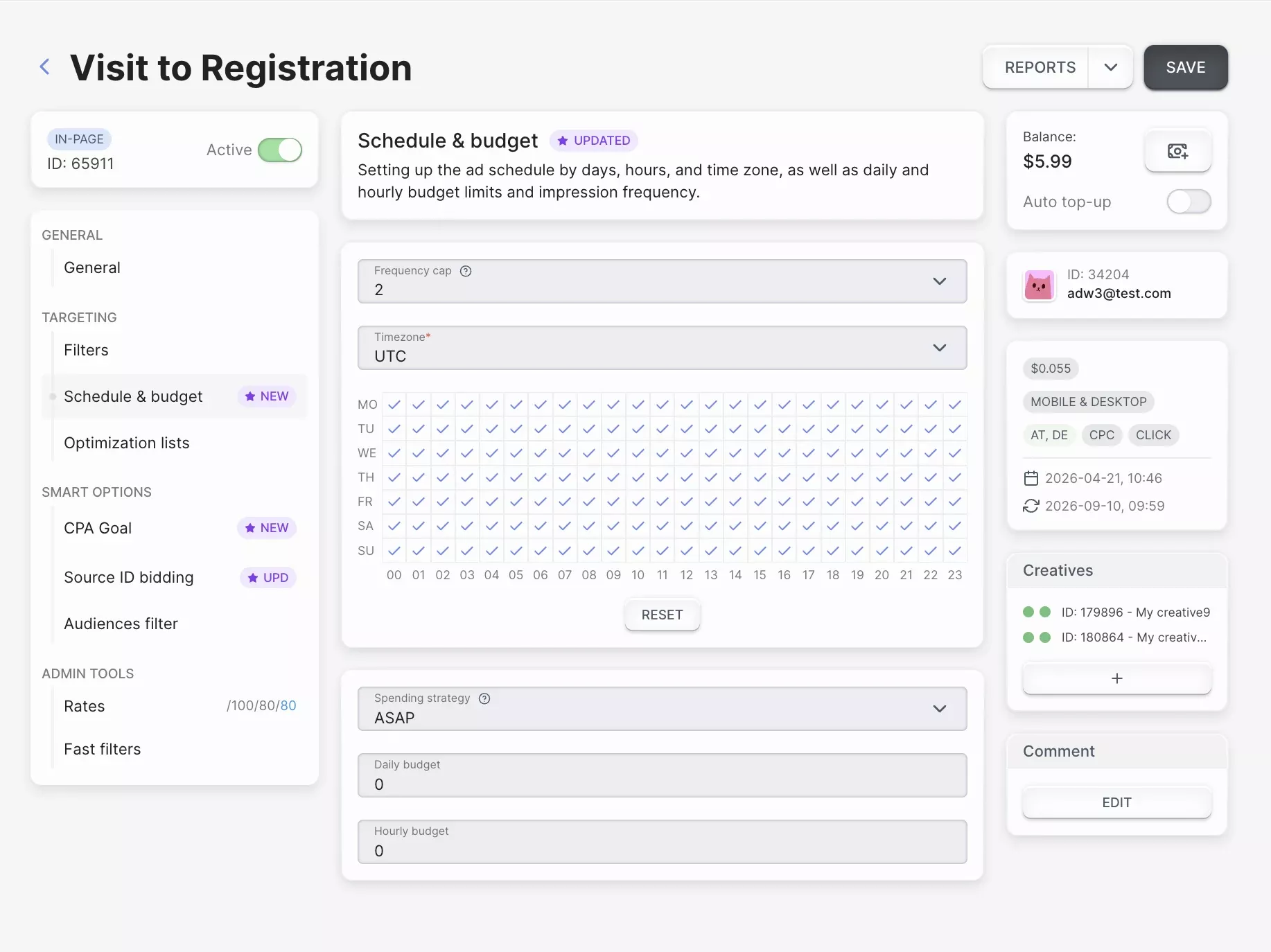
On ADMY retargeting campaigns I start at 2 impressions per user per day. I raise the cap to 5 only when a traffic source brings more than 10 conversions a day on less than $10 of daily spend. A B2B source with a few conversions a day stays below that threshold, so a B2B campaign keeps the cap at 2.
The daily cap alone leaves a long cycle exposed. Two impressions a day across a 90-day audience window can add up to 180 impressions for one person who never converts. I'd rotate creatives inside each stage and add a weekly cap where the platform supports one. For anyone who has sat in the audience for weeks without a click, lower the frequency.
What B2B Retargeting Costs
B2B retargeting costs depend on the channel far more than on the retargeting itself. On the ADMY exchange, retargeted inventory costs the same as the same formats bought on broad targeting, so the audience adds no premium. ADMY runs full-cycle retargeting as a managed service, from the pixel to creatives and campaign management. LinkedIn and Google price through their own auctions, and the price moves with the job functions, geography and competition in your category.
A small audience also makes the budget easy to plan in advance. Multiply the audience size by the daily cap and the number of days, and you get the impressions the campaign can buy: 3,000 people at 2 impressions a day for 30 days gives 180,000 impressions a month. Apply your CPM to that number and you have the monthly figure before anything goes live.
I'd judge the result by cost per meeting or per opportunity, because that is where a B2B campaign shows its value. Clicks come from the whole audience, and the buying committee is the part of it that moves the deal.
Measuring Lift, Not Attributed Conversions
Attributed conversions overstate what B2B retargeting adds, because the audience consists of people who were already interested. With view-through windows and cycles that run for months, a deal that would have closed anyway gets credited to the last impression the buyer happened to see.
A holdout group gives a truer number. I'd exclude a random 10-20% of each audience from the ads. After a full sales cycle, compare the rate of opportunities created in the exposed and the held-out groups.
Check the size first. A 20% holdout cut from a 350-member LinkedIn audience leaves 280 people, below the 300 floor, and the exposed group stops serving. For small audiences, split by account list or by region instead of by random user.
Feed pipeline data back to the platforms as well. Import CRM stage changes such as opportunity created and deal won as offline conversions, so bidding optimizes toward accounts that move through the pipeline.
Frequently asked questions
Is B2B retargeting GDPR compliant?
B2B retargeting can run in the EU and UK, but a retargeting tag needs the visitor's consent before it fires. That rule comes from the ePrivacy Directive and, in the UK, PECR. GDPR sets the standard that consent has to meet. Expect European audiences to be smaller than your traffic suggests, and check the lawful basis for CRM uploads with your legal team.
What is the difference between B2B remarketing and B2B retargeting?
B2B remarketing usually means reaching known contacts again through email and CRM sequences. B2B retargeting means showing paid ads to people after they visited your site, though many teams use the two words as synonyms. Email works on contacts who left an address, retargeting covers the visitors who never did.
Does B2B retargeting work without third-party cookies?
B2B retargeting works without third-party cookies on most channels, because the tags write first-party cookies on your own domain. LinkedIn and Google match audiences to their own signed-in users. As of September 2026 Chrome still accepts third-party cookies by default, Safari blocks them, and Firefox keeps each site's cookies in a separate container.
Should you retarget existing customers?
Existing customers belong in a separate retargeting audience of their own. Build a list from your CRM of accounts approaching renewal or using only part of the product, and show them onboarding, new features or the next plan. Timing matters more here than frequency: start the renewal audience two to three months before the contract end date, when the budget conversation begins on their side.
Do you need a separate pixel if the LinkedIn Insight Tag is already installed?
The LinkedIn Insight Tag builds audiences for LinkedIn only, so each channel needs its own tag. Google needs the Google tag for remarketing lists, and a programmatic platform needs its own pixel, which ADMY installs as part of the setup. A tag manager, including a server-side container, keeps them in one place under the same consent rules.

More articles
 Iliya Dowlasov